

Many years ago, when we launched the first version of our system, I knew what it could do, but I didn’t yet know what it couldn’t do. No matter how much we tried to anticipate during design, real-world use would always reveal more.
The request to automate the capital call process was one of those moments. We built the first version and kept evolving it through multiple rounds of iterations. Even today, we’re still finding ways to make it better.
Looking back, I realized we weren’t simply adding features to a capital call function. We were validating our assumptions through real-world use, working closely with our internal team and investors, learning from their feedback and usage data, and expanding the automation as the business grew.
And that journey went through a few phases.
Starting Point — Basic Automation to Replace Manual Actions
The initial goal was simple: automate the manual actions involved in sending out capital calls and ACH authorization forms.
A capital call is the process in which an investment company sends a notice to investors asking them to provide money. This can happen when an investment is being activated, in which case the subscription amount and corresponding fees need to be wired. It can also happen later, for example, when a fund needs to collect annual management fees.
Depending on the situation, if ACH is chosen, an ACH authorization form also needs to be sent to the investor for signature.
Without automation, Ops would have to manually calculate the amount, create the PDF version of the capital call notice, and email it to the investor.
The offline workflow looked like this. I chose the core steps to automate, highlighted by the red boxes in the diagram below:
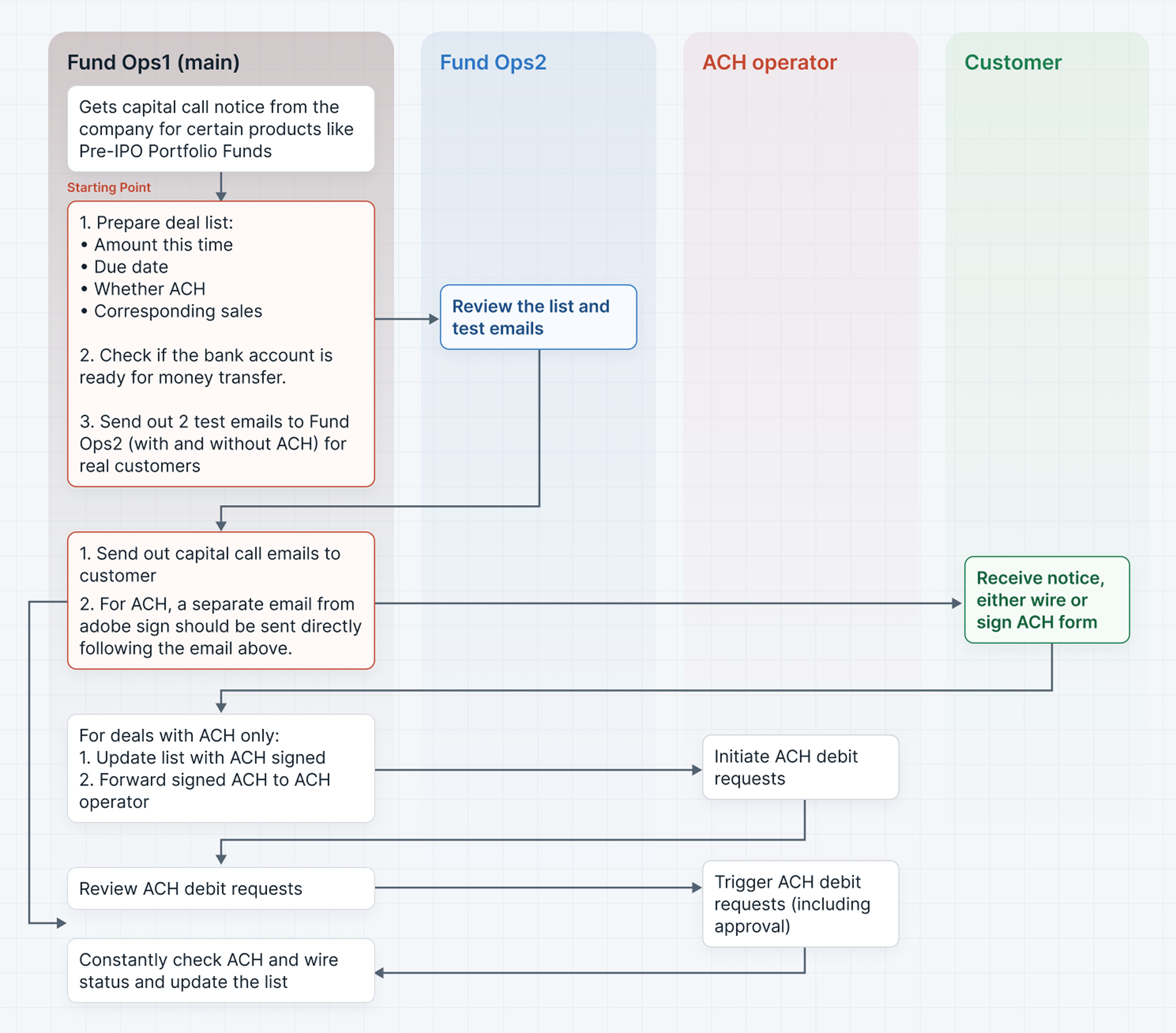
The system mainly automated what “Fund Ops” would otherwise do manually:
- Calculate the amount — the system would provide a default amount, which Ops could edit.
- Generate PDF capital call templates based on investment data.
- Send test emails for review.
- Send capital call notices to customers.
- Send ACH authorization forms to customers.
Since it was clear from the beginning that capital calls would often be performed in batches, the feature was designed mainly for batch processing. Nevertheless, processing a single record was also supported.
At this stage, the goal was not to automate every part of the capital call lifecycle. It was to replace the most repetitive manual actions and create a reliable starting point.
Upgrade 1 — Making Basic Automation Reliable
Once the basic automation was in place, we quickly learned that automating the happy path was only the beginning.
First, batch processing introduced its own challenges.
The job itself could fail partway through. For example, only half of the PDFs might be generated, or only half of the emails might be sent. In this case, we needed to think about how to make sure as much of the job was completed as possible. On the other hand, if partial failure was unavoidable, we also needed to think about how to communicate the failure clearly and give Ops a way to manually remediate it.
The user experience was another challenge. A batch operation might take some time to complete, while the Ops user was still working on other things. The user needed a clear indication of whether the process was still running, whether it had finished, or whether something had failed — without unnecessarily interrupting their work.
Initially, because the business was small, we aimed to support up to around 30 emails and PDFs at once. As the business grew, we eventually supported and verified batches of more than 100 emails and PDFs.
Even for extra-large batches — several hundred records, for example — there was no UI limitation. Ops could still initiate the operation as one batch; the background job automatically handled the division and sequencing.
More Improvements to Cover Real-World Use Cases
From the investor perspective:
- Investors did not want to receive the ACH signature request in a separate email. They wanted one email containing both the capital call notice and the ACH authorization request. Therefore, we combined these two separate emails into one email.
- Investors sometimes could not find the capital call notification email, or complained that the signing link was difficult to find. So we tried to make the email subject and action items stand out, and we also supported sending email reminders later on.
From the operational perspective:
- Sometimes an investor’s bank account was missing required information. In this case, Ops should be reminded before sending the ACH authorization form, rather than sending a form with incomplete information.
- For various reasons, such as an incorrect capital call amount, a capital call might need to be canceled. Cancellation also involved downstream dependencies: if an investment was canceled, any corresponding capital calls needed to be canceled; if a capital call was canceled, the corresponding ACH request, if any, also needed to be canceled.
Each of these sounds small on its own. Together, they started turning a simple automation feature into a much more usable and complete workflow.
Upgrade 2 — Connecting the Capital Call Lifecycle
Once the basic process became more reliable, we started to see another limitation.
We had automated the capital call itself, but a capital call does not exist in isolation. There are things that need to happen before the capital call is created, and things that need to happen after the investor sends the money.
Before the Capital Call
The initial capital call amount was determined by the fee structure configured at the fund level, and then could be adjusted for each individual investment.
This made the fund-level fee structure an important piece of the process, as its configuration would serve as the default for each investment.
So the automation was no longer limited to the capital call screen itself. The information used to create the capital call at the fund level also became part of the workflow.
After the Capital Call
The process also continued after the investor received the notice and sent the money.
When Ops receives the money, they need to record the incoming transaction. That transaction needs to be linked to the correct capital call.
Then the system can determine what happens next:
- If the wire amount is equal to or greater than the capital call amount, the capital call can be automatically closed.
- If the wire amount is smaller than the capital call amount, Ops needs to review it and decide whether the capital call should be closed. Sometimes it can still be closed, manually by Ops, if the difference is only a few dollars.
At this point, automation was no longer just about replacing a manual action. It was starting to connect different stages of the business process.
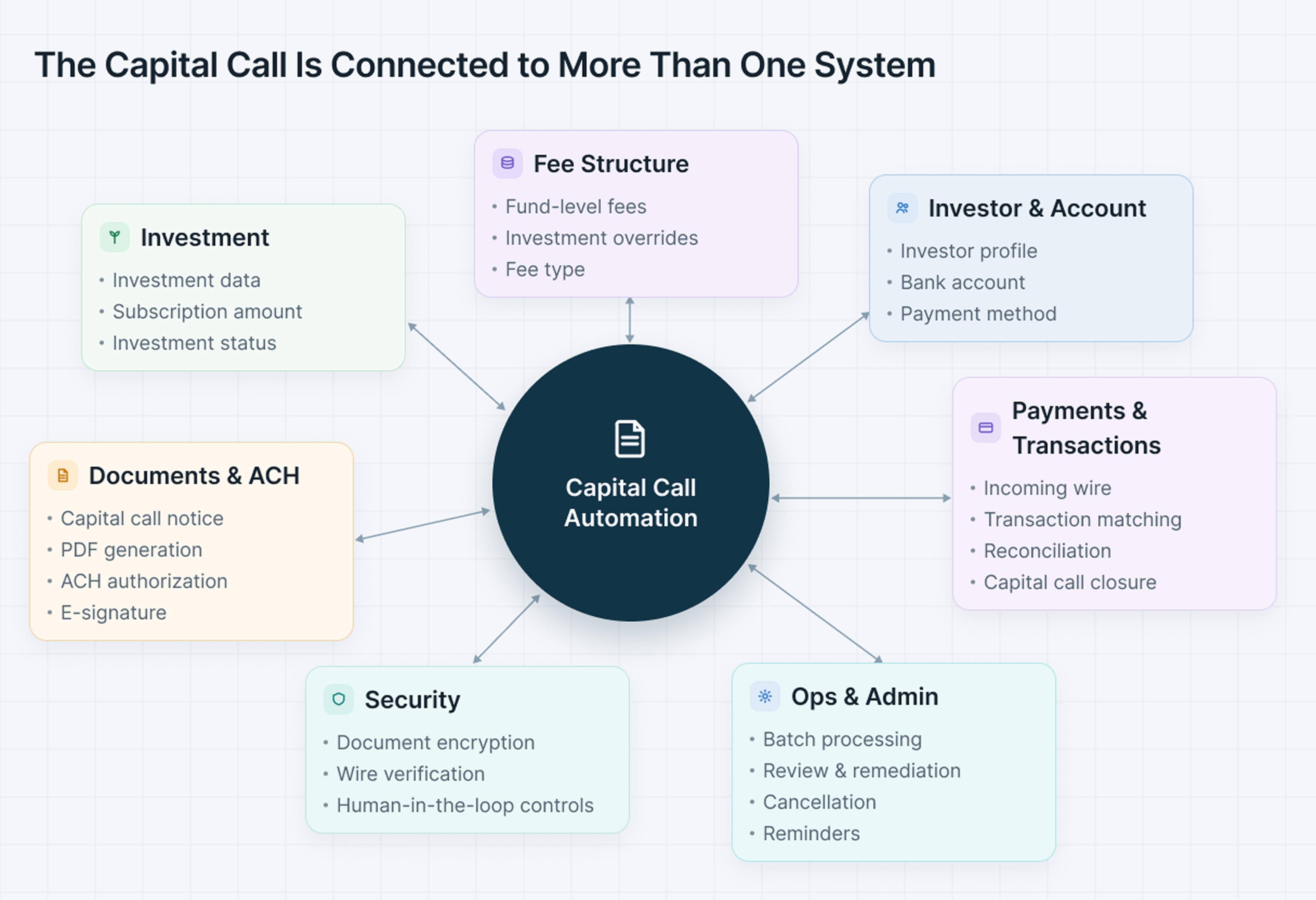
What started as a single feature gradually became connected to multiple parts of the system, including investments, fees, documents, payments, security, and Ops workflows.
Upgrade 3 — Adapting to New Business Scenarios
After several rounds of iteration, the capital call function started to feel relatively self-contained.
But as the business grew, the business itself changed. Initially, when the business was new, capital calls were mostly sent when an investment was initiated and the subscription amount needed to be collected. Later, as more investments became active, some of them needed to collect annual fees, such as management fees or expenses.
This introduced a new type of capital call — and with it, a different set of product requirements.
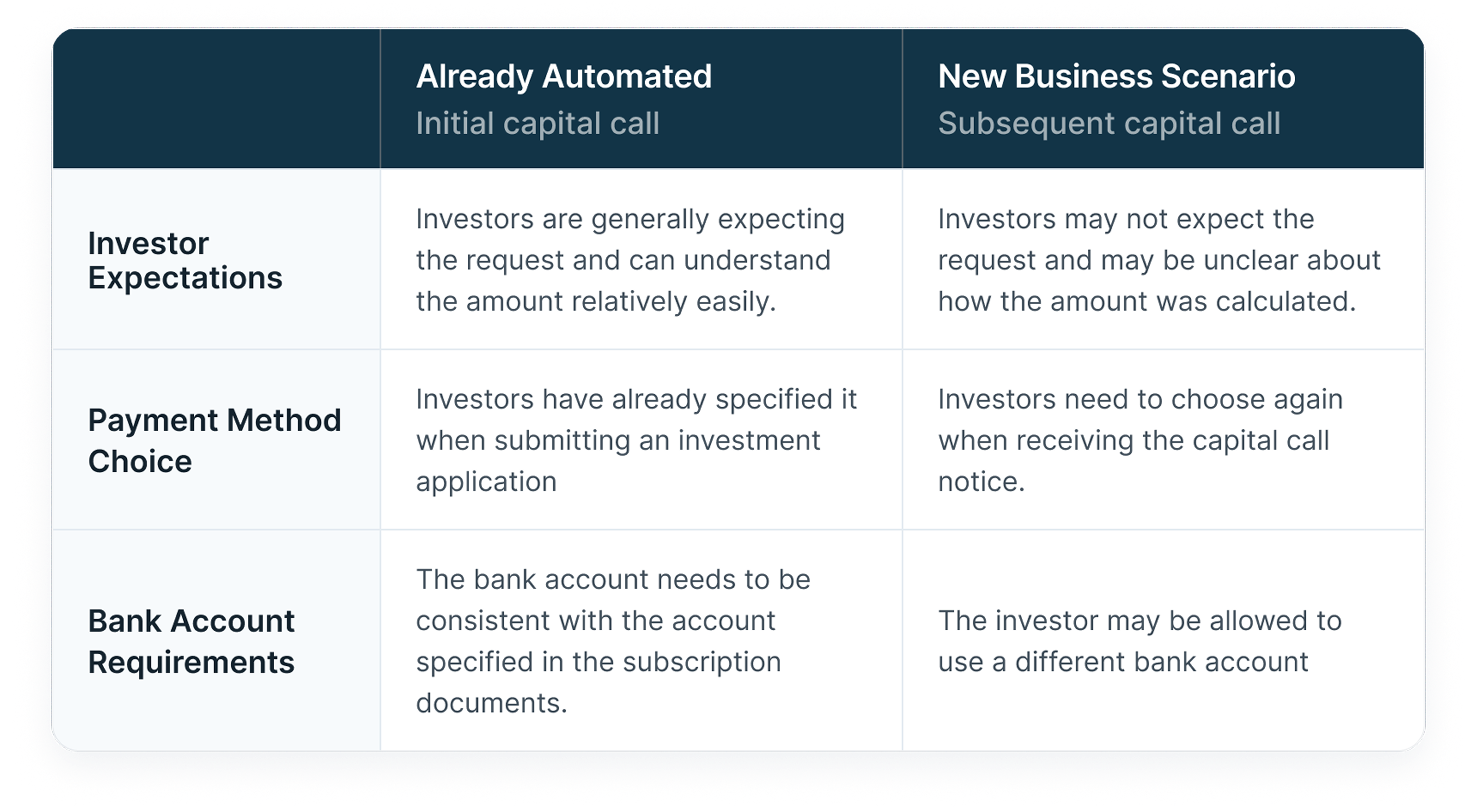
These may look like small gaps in the product. But they can make a huge difference to the day-to-day work of the Ops team and to the investor experience. For example, if the email subject of a capital call notice does not clearly and concisely explain what the capital call is for, an investor may easily miss or ignore it. That can delay fee payments and create additional work for Ops.
These differences required the system to evolve beyond its initial design and adapt to new business scenarios. This is where I started to see another side of product evolution: the system needed to become more adaptable to the business it was supporting.
Automation does not eliminate the need to understand the business context. It makes understanding the context even more important.
Security Upgrade
There was another dimension that did not fit neatly into the three stages above: security.
As the system became more automated, we also had to think more carefully about what should and should not be automated.
Documents containing sensitive private information needed to be encrypted. The encryption mechanism needed to be designed carefully to improve security without creating too much friction for investors or adding too much extra work for Ops.
We also introduced an additional security measure for wiring money: investors were asked to verbally confirm the wire instructions with their investment consultant before sending the money. This did not significantly change the online process itself, but it meant that the related instructions had to be spelled out clearly in the capital call notices.
And this is another interesting aspect of automation: Sometimes, improving a workflow does not mean putting everything into the system. Some parts still depend on humans. The product needs to make that boundary clear.
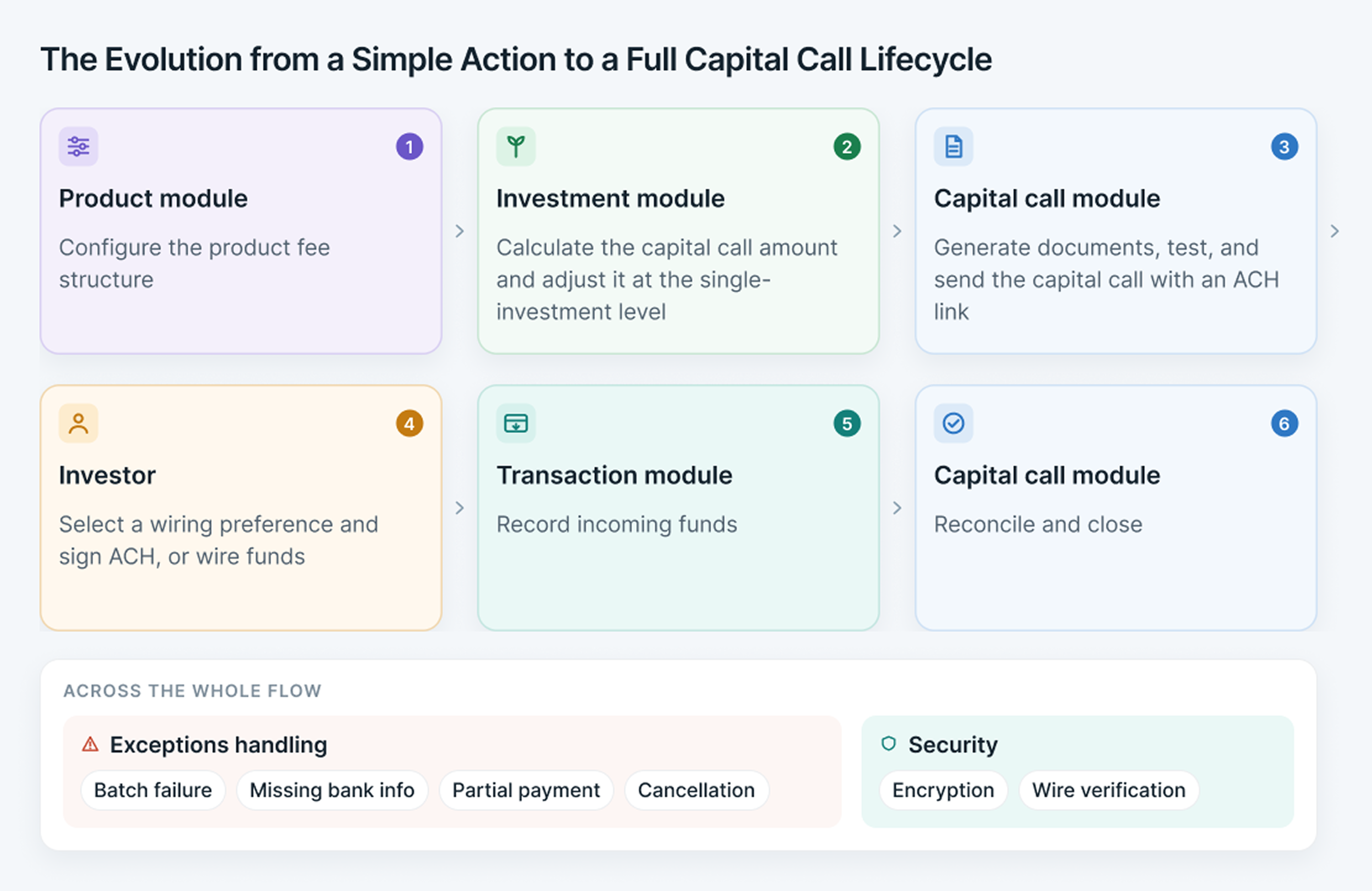
The capital call evolved from a simple automated action into a lifecycle involving setup, communication, payment, reconciliation, exceptions, and human review.
Looking Back: The Depth and Width Behind a Feature
Looking back at the evolution of the capital call feature, what stands out is not how sophisticated the system eventually became, but how it evolved alongside the business and our growing understanding of its needs.
The initial version was based on what we knew at the time. We started by automating the obvious manual work. Then real users started using it. Exceptions appeared, and we had to make the automation more reliable.
We discovered that the capital call did not exist on its own, so we started connecting the steps before and after it.
Then the business grew. New types of capital calls emerged, and the system had to adapt to new business scenarios.
Security requirements also became more sophisticated.
And each of these changes revealed something we could not have fully known when we built Version 1.
I’ve learned that there are no truly “small” features. Every feature has its own depth and width — its own details and edge cases, as well as the processes, systems, and people it touches.
That does not mean we need to build everything from day one. It means we should acknowledge the potential complexity, explore it as early as possible, and prioritize what needs to be built now, while leaving enough room for the feature to evolve later.
Good automation starts small, but it should be designed with the bigger picture in mind. The goal is not to automate everything at once, but to start with what matters most, learn from real-world use, and keep evolving the system as the business evolves. Sometimes, the complexity we see in financial products is simply the accumulated knowledge of what happens when a system meets the real world.